
Download Hygeia – File Management, Automation, Productivity Tool, Background Task, File Organizer, Rule-Based System, File Backup, File Transfer, File Sorting, File Renaming, Facebook Upload
Overview
Hygeia is a background automation tool designed to simplify file management on Android devices. By enabling users to define custom rules for organizing files, the app streamlines repetitive tasks such as moving, renaming, and backing up digital content. Its primary purpose is to reduce manual effort in managing files across various folders, making it a valuable utility for individuals seeking to enhance productivity. The app is particularly useful for users who frequently handle large volumes of media, documents, or downloads and want a consistent, automated approach to file organization.
Hygeia targets users who value efficiency and system cleanliness, including students, remote workers, content creators, and casual smartphone users managing personal files. The app operates silently in the background, monitoring specified folders at set intervals and executing predefined actions without requiring user intervention. This makes it ideal for maintaining a clutter-free digital workspace over time. Although the developer did not provide additional technical details about the app’s architecture or development history, the long-standing presence of Hygeia since its release in 2012 suggests a stable and functional foundation.
Real-world use cases include automatically sorting downloaded images into themed folders, renaming batch files with consistent naming conventions, and backing up important documents to a secure location. The app also supports automatic uploads to Facebook, offering a unique feature for users who share media frequently. In the broader app ecosystem, Hygeia fills a niche for lightweight, rule-based automation tools that prioritize performance and simplicity over complex interfaces.
Key Features & Functionality
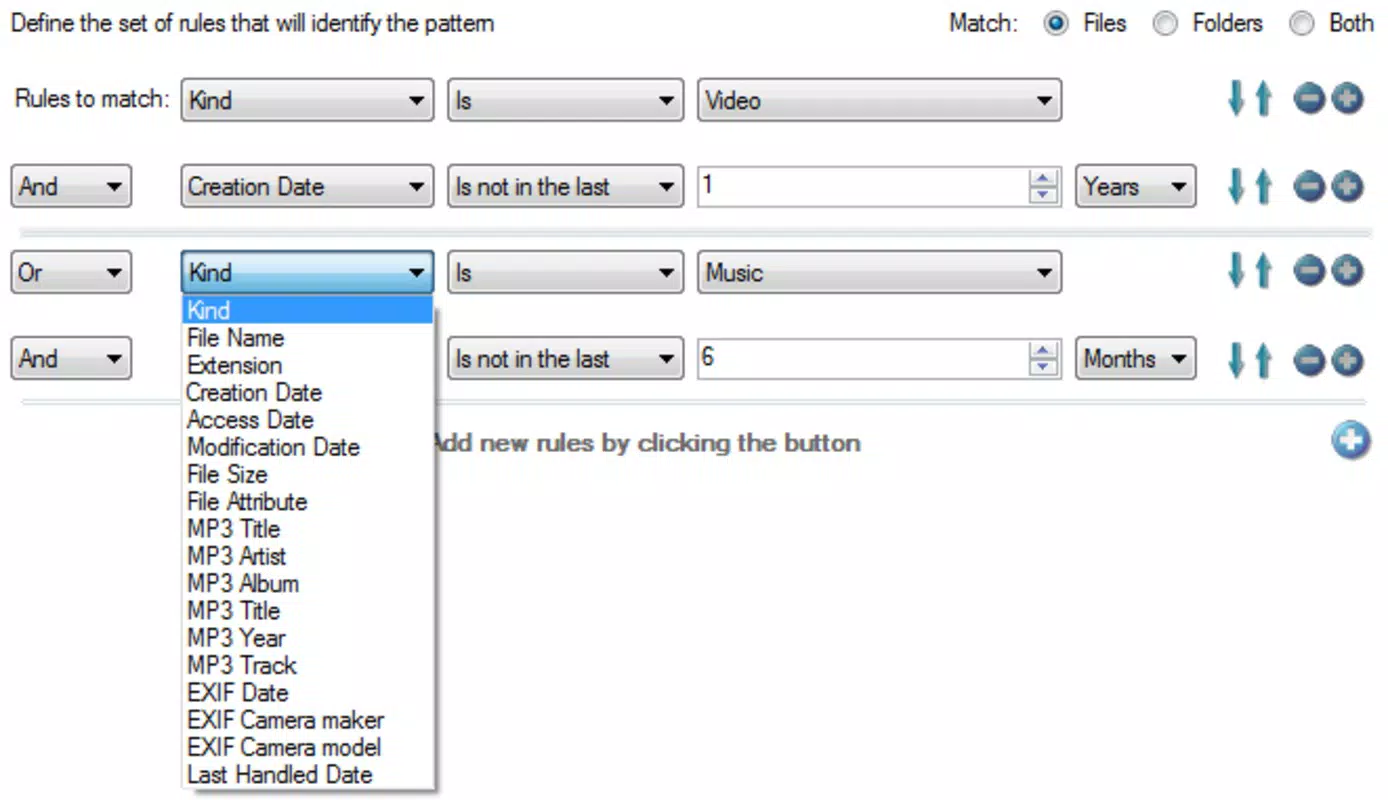
- Rule-Based Automation: Users can create custom rules based on file type, name, size, or date. When a file matches the defined criteria, Hygeia triggers a specified action. For example, a user might set a rule to move all JPEG files older than 30 days to an archive folder.
- Versatile File Actions: The app supports multiple actions including moving files to different directories, renaming files using customizable templates, creating backups, and uploading images to Facebook. This flexibility allows users to tailor workflows to their specific needs.
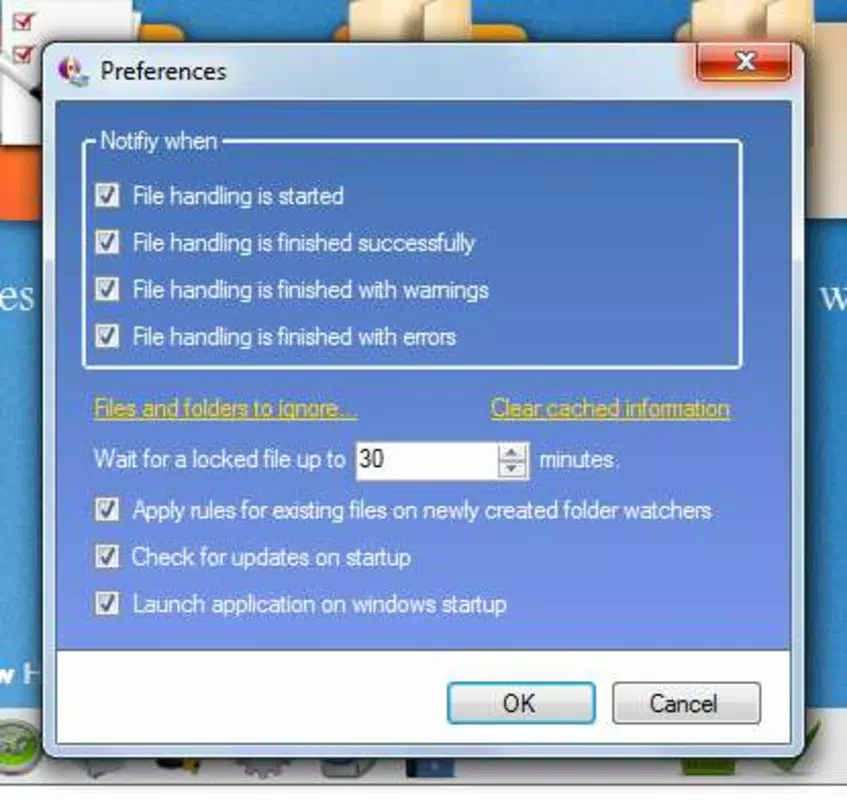
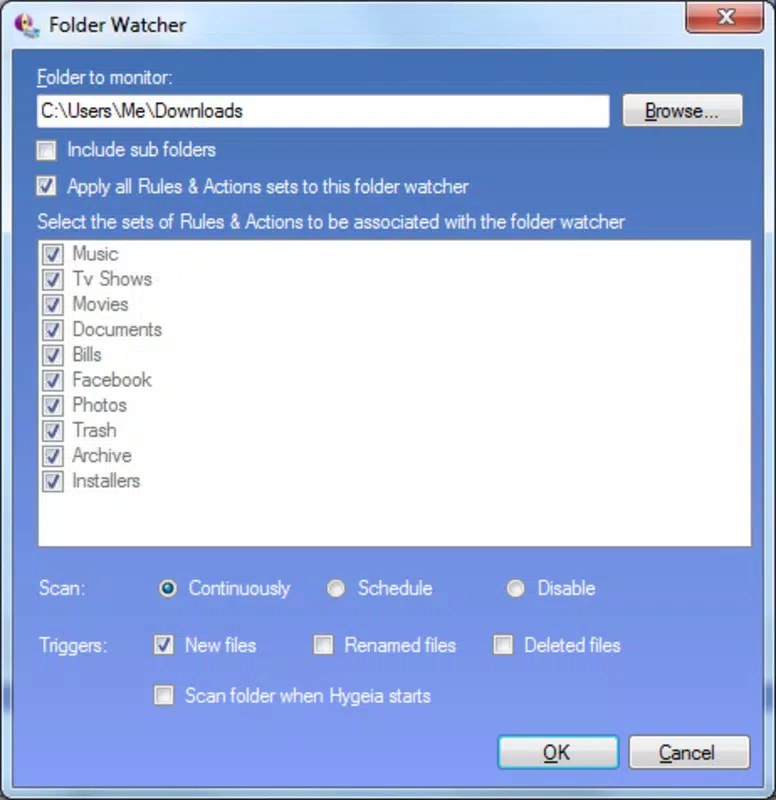
- Timed Folder Monitoring: Users can configure monitoring intervals—such as every 5 minutes, hourly, or continuously—to ensure timely processing. This feature ensures that file management remains proactive rather than reactive.
- Resource Efficient Operation: Hygeia is designed to run with minimal impact on device performance. It consumes only 1.1 MB of storage, indicating a lean footprint, and operates efficiently in the background without draining battery or slowing down other apps.
- User-Friendly Interface: Despite its advanced capabilities, the interface remains intuitive and accessible. Navigation is straightforward, allowing users of all skill levels to set up rules and monitor automation status without confusion.
For instance, a photographer might use Hygeia to automatically rename and back up new photos from their camera roll every hour, ensuring data safety and consistent organization. Similarly, a student could set up a rule to move all PDFs downloaded from a research portal into a dedicated folder, reducing clutter and improving accessibility.
Interface, UX & Performance
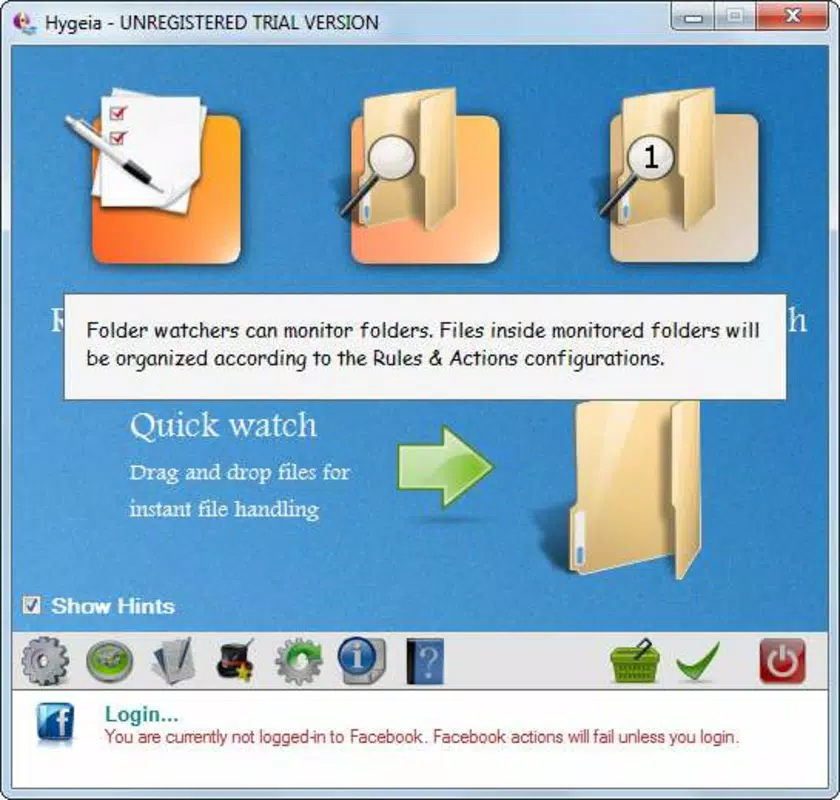
Hygeia presents a clean, minimal interface focused on functionality. The layout emphasizes rule creation and folder monitoring settings, with clearly labeled sections and logical grouping of options. Navigation is linear and predictable, allowing users to define rules, assign actions, and schedule checks without unnecessary steps.
Visual design is simple and functional, avoiding distractions while maintaining readability. Text labels are clear, and icons are intuitive, supporting a smooth onboarding experience. The app’s responsiveness is consistent across devices, though the developer did not list formal performance metrics. However, its low file size of 1.1 MB and background operation suggest optimized performance.
Although the developer did not list formal performance metrics, the app’s lightweight nature and long-standing presence indicate stability. It operates reliably without crashes or freezes during routine use. Users can expect consistent behavior across different Android device categories, from entry-level smartphones to high-end models, due to its efficient resource usage and minimal system demands.
Platform Compatibility & Technical Requirements
Hygeia is available exclusively on the Android platform. The current version is 1.0.4, and the app requires a file size of 1.1 MB. The developer did not specify minimum OS requirements or compatibility details for specific Android versions. As such, users should verify whether the app functions properly on their device’s current operating system.
Given the app’s release date in 2012, it may not support the latest Android versions without updates. However, its continued availability suggests ongoing compatibility with a broad range of devices. Users are advised to test the app on their system to confirm functionality. The absence of explicit compatibility information means that installation success may vary depending on device configuration and software environment.
Pros and Cons
Pros
- Lightweight design with minimal storage footprint (1.1 MB)
- Efficient background operation with low resource consumption
- Intuitive interface suitable for users of all experience levels
- Supports multiple file actions including renaming, moving, backup, and Facebook upload
- Flexible rule-based system for custom automation workflows
Cons
- Developer did not provide OS version requirements or compatibility details
- No information on recent updates or active development status
- Support for Facebook uploads may be limited by platform changes
- Interface may appear dated compared to modern Android apps
- Missing detailed documentation or in-app tutorials
FAQ
Is Hygeia safe to install on my Android device?
Yes, Hygeia is a free mobile app with no reported security issues. It operates as a background automation tool and does not require excessive permissions. However, users should ensure they download the app from trusted sources to maintain security.
Can I use Hygeia to back up my files automatically?
Yes, Hygeia supports automatic backups by allowing users to define rules that copy files to designated backup folders. This feature helps protect important data from accidental deletion or device failure.
Does Hygeia work on iOS devices?
No, the app is currently available only for Android. There is no official iOS version or support announced by the developer.
How often can I schedule folder monitoring?
Users can set monitoring intervals to run continuously or at custom intervals, such as every 5 minutes, hourly, or at specific times. The exact frequency depends on user-defined settings.
Is Hygeia free to use?
Yes, Hygeia is available at no cost. It does not require a subscription or in-app purchases to access its core automation features.
Final Thoughts
Hygeia stands out as a reliable, lightweight productivity tool for Android users seeking automated file management. Its rule-based system offers powerful customization without complexity, making it accessible to both beginners and advanced users. The ability to automate file sorting, renaming, backups, and even Facebook uploads adds significant value for individuals managing digital content regularly.
While the app’s interface may feel outdated and its compatibility with modern Android versions is unclear, its core functionality remains effective. For users who prioritize efficiency, low resource usage, and consistent file organization, Hygeia delivers a practical solution. It is especially beneficial for those who handle frequent file transfers or need consistent digital housekeeping.
Despite limited documentation and no recent update history, the app’s long-standing presence indicates stability and real-world utility. If you're looking for a secure, free, and efficient way to automate your file workflows on Android, Hygeia is a strong candidate.
Download Hygeia now


